Load, plot, and metadata storage
This example demonstrates how to:
Load size-resolved ELPI data (
Aerosol2D)Plot the data quickly with
plot_timeseriesInspect metadata stored from the loaded data
[1]:
import aerosoltools as at;
Next we import the ELPI data via the Load function. The filename variable should give the path and filename of the relevant dataset.
[2]:
filename = r"..\..\tests\data\Sample_ELPI.txt"
ELPI_data = at.Load_ELPI_file(filename);
################# Warning! #################
          Density ≠ 1.0 assumed
  Bin edges estimated via geometric means
###########################################
The data is now loaded and can be treated or plotted directly.
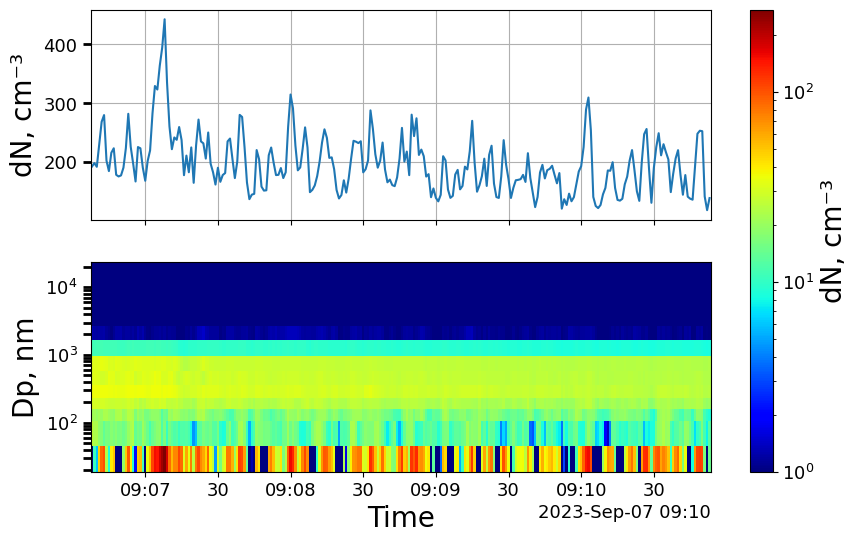
A quick way to visualize the data is via a timeseries plot, which can be done with a single line of code, as seen below. Here it is important to note, that the keyword y_3d is used to give a lower bound of 1 for the logarithmic colorbar. This was needed as some concentrations were reported as 0, which cannot be shown on a log scale.
[3]:
ELPI_data.plot_timeseries(y_3d=(1,0));
Check Various metadata
We can also check various metadata loaded directly from the elpi data file
[4]:
# We can check the unit of the data.
# All load functions return number concentration data also if the original data file was in a different mode
print(ELPI_data.unit)
cm⁻³
[5]:
# We can check the data type
print(ELPI_data.dtype)
dN
[6]:
# We can ensure that the correct instrument was stored
print(ELPI_data.instrument)
ELPI
[ ]:
# We can check the density of the datafile, which should always be given in g/cm3
print(ELPI_data.density)
0.14
A lot of data can be stored in the metadata. Metadata is stored in a dictionary, where all values can be accesseed via their respective keys. The available keys within the current metadata of an object can be shown as:
[9]:
list(ELPI_data.metadata)
[9]:
['Date',
 'Time',
 'Location',
 'Description',
 'Operator/run',
 'Cleaned',
 'Sampled',
 'UnitNo',
 'FlowRate',
 'D50values(um)',
 'Pressure(kPa)',
 'ResTime',
 'DiffLossFit',
 'FilterLow(um)',
 'FilterCal',
 'ChargerSetup',
 'ChargerI(uA)',
 'ChargerU(kV)',
 'TrapU(V)',
 'Efficiency(Dp/mult/exp)',
 'VersionNo',
 'DelimiterChar',
 'RawData',
 'StokesDp',
 'density',
 'bin_edges',
 'bin_mids',
 'instrument',
 'serial_number',
 'dtype',
 'unit']